USB4 Gen 3 vs Thunderbolt 5: Next-Gen 80Gbps Docking
By Anika Rao • 29th May
USB4 Gen 3 vs Thunderbolt 5 isn't really about who hits 80Gbps on the box; it's about which path gives you deterministic, fleet-wide 80Gbps docking performance with the fewest tickets. This next-generation docking comparison focuses on what matters for your rollout: pixels, power, and predictability.
If you own the end-user experience for a hybrid fleet, you've already seen how pretty diagrams fall apart when one laptop silently negotiates down to 2 lanes or an HDMI hop caps a 4K panel at 30 Hz. When we talk USB4 Gen 3 vs Thunderbolt 5 for a next-generation docking comparison, the only honest question is: which one keeps every desk behaving the same on Monday morning.
1. The 80Gbps reset: what's actually new?
Before we compare, translate the spec-sheet mess into three buckets:
-
USB4 (40Gbps, today's baseline) USB4 was introduced to bring USB-C up to Thunderbolt 3/4 class speeds, with a maximum of 40Gbps total bandwidth and support for DisplayPort tunneling and PCIe. [1][6] It rides the USB-C connector and is backward compatible with USB 3.x and USB 2.0. [6]
-
"USB4 Gen 3" (80Gbps, effectively USB4 Version 2.0) The USB4 Version 2.0 spec doubles the ceiling to 80Gbps, but as of 2025 it is still in early market rollout and not widely deployed. [1] See our USB4 Gen 3 (80Gbps) explained for a deeper technical explainer of signaling, bandwidth modes, and host requirements. Vendors will market this variously as USB4 v2, 80Gbps USB4, or USB4 Gen 3; electrically it is the same class of 80Gbps USB4.
-
Thunderbolt 5 (80Gbps baseline with 120Gbps boost) Thunderbolt 5 builds on Thunderbolt 3/4, doubling the baseline bandwidth from 40Gbps to 80Gbps. [3][4] It adds an asymmetric "Bandwidth Boost" mode that can push 120Gbps in one direction while maintaining 40Gbps in the other, specifically to feed high-resolution displays. [2][3][4] It integrates DisplayPort 2.1 and supports significantly higher resolutions and refresh rates than Thunderbolt 4. [1][4]
The result: both USB4 80Gbps and Thunderbolt 5 live in the same headline speed tier, but Thunderbolt 5 adds a display-biased turbo mode and stricter feature expectations.

2. Standards at a glance (numbers first)
| Feature | USB4 40Gbps (today) | USB4 80Gbps ("Gen 3" / USB4 v2) | Thunderbolt 5 |
|---|---|---|---|
| Max link bandwidth | Up to 40Gbps total [1][6] | Up to 80Gbps total (spec limit) [1] | 80Gbps baseline; up to 120Gbps one-way with Bandwidth Boost [2][3][4][7] |
| Connector | USB-C only [6] | USB-C only [1] | USB-C, backward compatible with TB4 & USB4 devices [3][4] |
| Power delivery ceiling | Up to 240W where USB PD 3.1 EPR is implemented [3] | Same USB PD 3.1 EPR limits (up to 240W) in principle [3] | Up to 240W charging support [2][3][4][7] |
| Display technology | DisplayPort tunneling (typically DP 1.4) [1][3] | Spec can pair with newer DP versions; real-world adoption still emerging [1] | Integrated DisplayPort 2.1, optimized for multiple high-res displays [1][3][4] |
| Typical display claims | Often dual 4K@60 or one 8K (device-dependent) [4][7] | In theory similar to or better than TB4 with 80Gbps headroom (implementation-dependent, inference) | Dual 8K or triple 4K and high-refresh 4K (up to very high Hz in some configs) [2][4] |
| PCIe tunneling | Required/used in most PC implementations [3][8] | Carried forward, with more headroom for storage and add-ons (inference) | PCIe Gen 4 support for faster external devices [1] |
| Deployment status | Common in modern laptops/peripherals [1][6] | Early rollout, limited device availability as of 2025 [1] | Announced and emerging; designed to be backward compatible with TB4/USB4 ecosystems [3][4] |
The table hides the operational truth: USB4 80Gbps describes what's possible; Thunderbolt 5 describes what must be supported if a device wears the badge.
If pixels stutter, we chase the bottleneck until silence.
3. Display headroom: where 80Gbps actually shows up
For IT, 80Gbps only matters if it translates into "plug in and always get the expected pixels." Let's anchor on concrete docking targets.
3.1 Thunderbolt 5 display behavior
Thunderbolt 5's headline gain is display density:
- Baseline 80Gbps link, with an asymmetric mode that can shift up to 120Gbps in the display direction and 40Gbps back. [2][3][4][7]
- Integration of DisplayPort 2.1, which carries enough payload for multiple high-resolution, high-refresh panels. [1][3][4] For practical resolution/refresh combinations, see our DisplayPort 2.0 resolution guide.
- Vendor claims of support for dual 8K or triple 4K monitors, and very high refresh rates at 4K (up to 144 Hz and above depending on the setup). [2][4]
From a dock design perspective, this allows:
- More native DP 2.1 outputs from a single TB5 controller without leaning on heavy compression.
- Enough headroom to keep USB, PCIe storage, and Ethernet stable even when all displays are lit.
The practical win is not just "supports three 4K displays," but "supports three 4K displays while a user is copying a project to fast external NVMe and on a video call," without intermittent black screens.
3.2 USB4 80Gbps ("Gen 3") display behavior
USB4 80Gbps (USB4 v2) doubles the raw pipe to 80Gbps, matching Thunderbolt 5's baseline bandwidth. [1][3] However:
- The spec enables 80Gbps, but does not force every USB4 v2 implementation to support the same display feature set. That is consistent with how USB4 40Gbps works today, where capabilities like PCIe tunneling and DP versions vary by device, even though the connector and logo look identical. [3][6][8]
- As of 2025, USB4 v2 is still in early rollout, so there is limited, public dock-class evidence of "real" 80Gbps multi-monitor behavior. [1]
In theory, an 80Gbps USB4 dock with DP 2.x Alt Mode could approach Thunderbolt 5-class display configs (for example, triple 4K or high-refresh 4K), but how consistently that happens across vendors is an open question today. That uncertainty is exactly what burned teams on the first rounds of "Thunderbolt-compatible" USB-C docks.
I've seen this play out before: a trading floor move to triple 4K looked fine on paper with two different 'TB' docks, but link training revealed bandwidth compromises on half the stack. Once we standardized on a compliant TB4 dock with dual DP outputs and certified short cables, the support tickets vanished. The technology changed; the root lesson did not.
Show me the link training logs.
4. Data, PCIe, and peripherals under load
Enterprise docks are no longer just for displays. They're also hosting:
- 2.5/5/10GbE network adapters
- UVC cameras and conference gear
- External NVMe or RAID for media and engineering workflows
4.1 Thunderbolt 5 for high-bandwidth professional docking
Thunderbolt 5 explicitly lists support for PCIe Gen 4, effectively doubling per-lane throughput over PCIe Gen 3. [1] Combined with 80Gbps/120Gbps link modes, that enables:
- Faster external storage and scratch drives with fewer bottlenecks. [4][7]
- More headroom for simultaneous high-bitrate video capture and multi-display output.
In other words, TB5 is tuned for high-bandwidth professional docking scenarios where display, storage, and network traffic all spike together (think creators, engineers, and medical imaging).
4.2 USB4 80Gbps for mixed workloads
USB4 (40Gbps) already supports PCIe tunneling and high-speed peripherals. [1][3][6] USB4 80Gbps logically doubles that bandwidth pool, which should improve:
- Peak throughput for external NVMe and high-speed card readers.
- Aggregate performance when multiple USB and network devices share the dock.
However, because USB4 is more flexible and less prescriptive than Thunderbolt, you'll need to verify per-device whether:
- PCIe tunneling is implemented at full width and speed.
- Host firmware and OS enable the higher 80Gbps modes with your chosen cable.
For general knowledge-worker docks (dual 1440p or dual 4K, gigabit Ethernet, webcam, keyboard/mouse), USB4 40Gbps already suffices when done right. USB4 80Gbps becomes most compelling where you are bandwidth-bound today, such as heavy external storage or multi-4K/6K arrays.
5. Power delivery and workstation charging
5.1 Thunderbolt 5 power profile
Thunderbolt 5 is designed to support charging up to 240W to the host, enough to cover gaming-class laptops and mobile workstations that exceed the old 100W limit. [2][3][4][7] That aligns with USB Power Delivery 3.1 EPR (Extended Power Range).
This matters if you are:
- Standardizing on single-cable desks for 130 to 200W mobile workstations.
- Trying to retire proprietary barrel adapters and OEM-only docks.
5.2 USB4 80Gbps and power
USB4 and Thunderbolt 4 already ride on the same USB PD stack, with support for up to 240W power delivery where PD 3.1 EPR is implemented. [3] USB4 80Gbps does not change that ceiling; it simply pairs higher data bandwidth with the existing power framework.
In practice, the constraint will be dock and PSU design, not the spec:
- Many "universal" docks still top out at 90-100W even though PD 3.1 permits more.
- You must pair 240W power with 5A, e-marked USB-C cables, or you will see negotiated power drop below what the laptop expects. [7] To avoid undercharging and random throttling, follow our USB-C power delivery guide.
For a future-proof workstation investment, look for:
- TB5 or USB4 docks rated for at least 140W host charging if you run performance notebooks.
- Clear, per-SKU documentation of maximum PD per port and total budget.
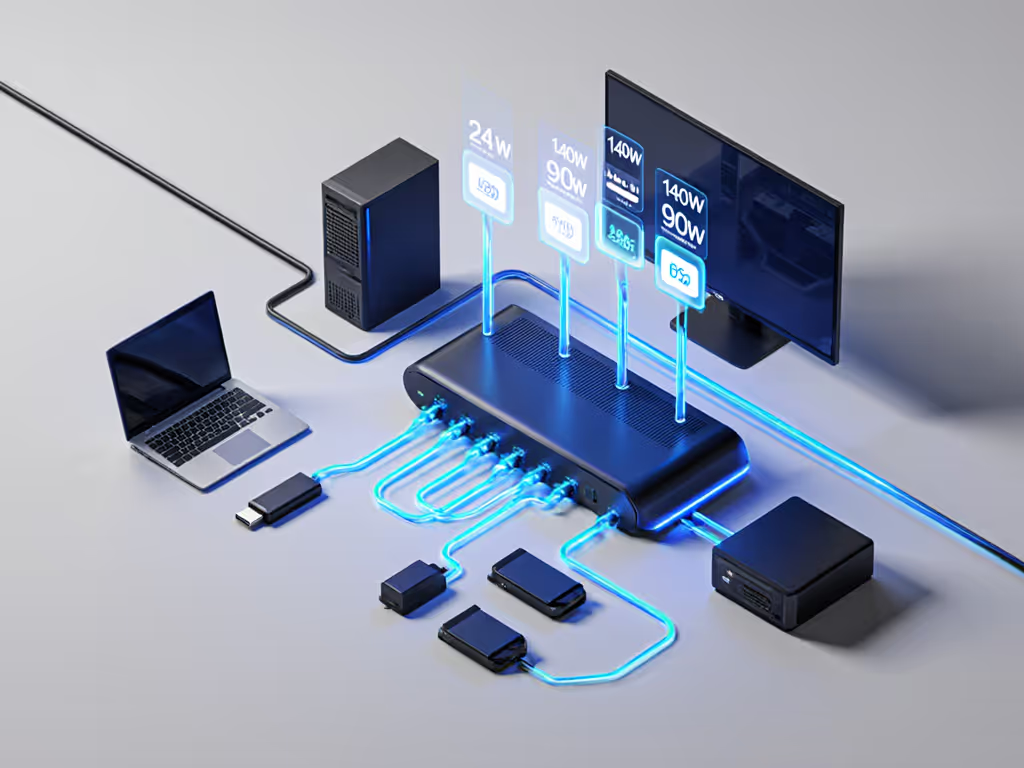
6. Cables, signal integrity, and why some 80Gbps docks will underperform
An 80Gbps-capable port is only as good as the weakest link between laptop and dock. The usual culprits:
- Non e-marked or low-current cables that silently cap at 3A/60W or reduced data rates. [7]
- Long, marginal cables that force link training to fall back from 80Gbps to 40Gbps (inference based on signal-integrity behavior in previous generations).
- Passive adapters that downgrade DisplayPort 2.1 output to HDMI 1.4, capping 4K at 30 Hz (common legacy issue, consistent with how HDMI/DP conversions behave, inference).
Thunderbolt 5 reuses the Thunderbolt 4 cable ecosystem, and is specified to remain backward compatible with TB4 and USB4 accessories. [3][4][7] That is a practical win: certified TB4 0.8 to 2.0 m cables you already standardize on should negotiate correctly with TB5 hosts at the best supported mode.
USB4 80Gbps has fewer visible guardrails today; some "USB4"-branded cables will remain 40Gbps-only. Expect mixed fleets where:
- A port and dock both support 80Gbps, but a user swaps in a spare 20Gbps/3A cable and silently loses capacity.
For hot desks and hoteling areas, the path of least pain is still:
- Ship known-good, labeled cables with each desk or monitor arm.
- Log and enforce cable SKUs just like docks.
7. Choosing between USB4 80Gbps and Thunderbolt 5 for standardization
From an IT operations standpoint, the decision is less about raw speed and more about predictability across a diverse fleet.
7.1 When Thunderbolt 5 is the better anchor
Thunderbolt 5 is the stronger candidate when you need:
- Deterministic multi-display performance: triple 4K or dual 6K/8K on trading, creative, or engineering desks, with headroom for heavy I/O. [1][2][4]
- High-bandwidth professional docking: external PCIe Gen 4 storage, high-frame-rate capture cards, VR/AR headsets, or multiple 10GbE adapters. [1][4]
- Cross-OEM consistency in premium laptops that already adopted Thunderbolt 3/4; TB5 is backward compatible with those ecosystems. [3][4]
Historically, Thunderbolt generations have shipped with tight Intel-driven certification programs; it is reasonable to expect TB5 docks and hosts to follow that pattern, which tends to reduce behavior variance between vendors (inference based on TB3/TB4 practice).
If you plan to create standardized kits by persona: for example:
- Creators: dual 6K + 10GbE + fast NVMe
- Quant/trading: triple 4K + low-latency network
- Conference rooms: dual 4K120 + pro camera/mic
Thunderbolt 5 gives you more room to over-provision today so you do not have to rebuy docks mid-lifecycle.
7.2 When USB4 80Gbps is viable - or preferable
USB4 80Gbps can be attractive where:
- Your primary use case is knowledge workers on dual 1080p/1440p or dual 4K@60 with modest USB peripherals.
- You expect a mix of systems that expose USB4 but not Thunderbolt, particularly in cost-optimized Windows or ChromeOS fleets. [6]
- You want to avoid perceived "vendor lock-in" around Thunderbolt branding, and are willing to do more validation per host model.
USB4 80Gbps-class docks will likely arrive across a wider range of price points. For large fleets, that could improve budget confidence, provided you:
- Maintain a living compatibility matrix by laptop model and OS.
- Explicitly document which USB4 hosts achieve 80Gbps vs 40Gbps with your chosen docks and cables.
8. Pragmatic rollout strategy (and what to test next)
To reduce tickets and surprises as you move toward 80Gbps docking, treat USB4 80Gbps and Thunderbolt 5 as two tiers in the same playbook.
8.1 Define clear performance tiers
-
Tier 1 - High-bandwidth workstations Creators, engineers, traders, AV/medical imaging. Standardize on Thunderbolt 5 docks with:
- Certified TB4/TB5 cables.
- At least 140W host charging.
- Native DP 2.x outputs sized for your maximum monitor stack.
-
Tier 2 - Advanced knowledge workers Dual 4K, light external storage. Either:
- TB5 docks (for maximum forward compatibility), or
- Well-validated USB4 80Gbps docks where you control host models tightly.
-
Tier 3 - General office/hoteling Dual 1080p/1440p, basic USB. High-quality USB4 40Gbps docks remain sufficient here.
8.2 Build a lab that reflects real desks
For each candidate TB5 or USB4 80Gbps dock, validate:
- Display behavior at your target resolutions/refresh rates on Windows, macOS, and any Linux/ChromeOS you support.
- Resume/wake behavior from modern standby and after OS updates. If you see black screens after sleep, our dock firmware update guide covers fixes and safe update steps.
- Sustained external NVMe performance alongside maxed-out displays.
- Power draw on your highest-TDP laptops under CPU+GPU stress while dock-powered.
Capture link training, PD negotiation, and error logs wherever possible - if there is one constant in my lab, it's this: Show me the link training logs.
8.3 Document and socialize a simple decision tree
Give your teams and partners a plain-language guide, for example:
- "If you need more than dual 4K or high-refresh 4K, pick a Thunderbolt 5 dock and cable."
- "If the laptop is USB-C only with USB4 but no Thunderbolt, cap expectations at dual 4K on our approved USB4 docks."
- "For anything over 100W charge, only use desks labeled with 140W+ capable docks and 5A cables."
That kind of operational clarity is what turns bleeding-edge specs into predictable, low-ticket deployments.
9. Where to go from here
Thunderbolt 5 and USB4 80Gbps both promise next-generation docking; the difference is whether your org wants stricter, Thunderbolt-style guarantees or more flexible, USB4-style options that demand heavier validation.
To move forward without rebuys:
- Start small: pilot one TB5 dock and one USB4 80Gbps dock in your lab. For vetted models to evaluate, start with our Top 5 Thunderbolt 5 docks.
- Map them against 5 to 10 key laptop SKUs and 3 to 4 representative monitor stacks.
- Track not just max specs, but stability under real workloads.
As your fleet refresh cycles bring in more USB4 and Thunderbolt 5 hosts, you will already have a tested, documented matrix ready to scale: hot desks that "just work," fewer escalations, and docks that can sustain the pixels you've promised for the next five years.