Pro VR Workstation Docks: Guaranteed Bandwidth Setup
By Omar Haddad • 5th Dec
For IT leaders managing VR/AR professional docking solutions across hybrid teams, standard virtual reality workstation docking isn't just about adding ports, it's about eliminating variables that cost you money. When your metaverse developers lose productive hours wrestling with flickering displays or unstable AR headset connections, that $200 dock just became a $2,000 ticket generator. Let's cut through the marketing noise with a procurement-friendly approach that guarantees bandwidth and sanity. For a concise breakdown of connection standards, see our Thunderbolt vs USB-C reality check. Fewer SKUs, fewer surprises.
Our help desk lived on dock tickets until we collapsed twelve SKUs into one Thunderbolt 4 kit: dock, 100 W PSU, two labeled DP cables, and a known-good USB-C cable. Procurement loved the predictability. Users loved the single cable. Ticket volume fell, and onboarding stopped improvising. Standardize the kit, and your tickets standardize themselves.
Why Standardization Is Your Cheapest VR Insurance
Before diving into specs, let's reframe this through an EUC manager's lens: predictability is the cheapest insurance you can buy. VR/AR workflows demand consistent bandwidth headroom, with no dropped frames during critical simulations or client demos. Yet most teams fail by treating docks as disposable accessories rather than lifecycle assets. Consider this math:
- $180 dock + $45 support ticket (avg. internal labor cost) × 15 tickets/year (per unstable unit) = $855 annual hidden cost
- Versus $299 premium dock with 3 tickets/year = $389 total cost
That's $466 saved per workstation yearly, enough to justify higher unit costs while slashing help desk volume. Now scale that across 500 seats.
5 Data-Driven Steps to Guarantee VR Bandwidth
1. Demand Bandwidth Headroom, Not Just Specs
Marketing claims like "supports 8K" are meaningless without sustained throughput. VR rendering requires at least 35 Gbps dedicated bandwidth after accounting for:
- Display Stream Compression (DSC) overhead
- Simultaneous peripheral data (AR headset tracking, USB audio)
- Network latency buffers
Action: Require docks with Thunderbolt 4/5 or certified USB4 (80Gbps) for professional VR workflow optimization. Avoid USB-C Alt Mode docks, they share bandwidth with display data, causing frame drops during heavy GPU loads. If evaluating a dock like the OWC Thunderbolt Go Dock, verify its real-world throughput with your specific headsets using tools like Blackmagic Speed Test.
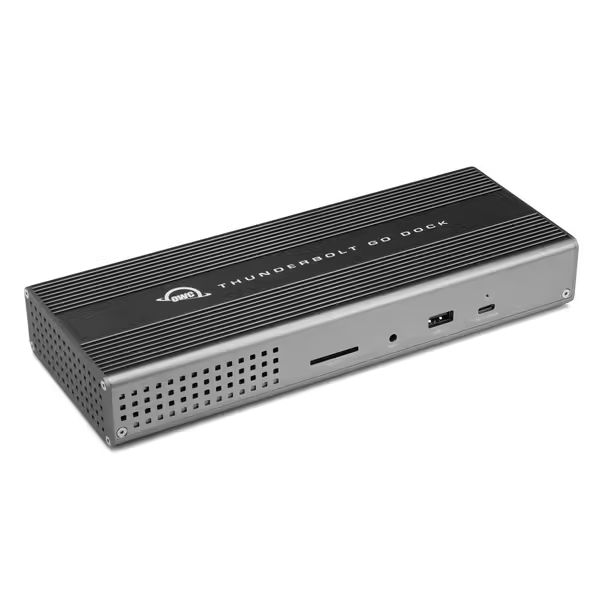
OWC Thunderbolt Go Dock
Unleash diverse connectivity and power with built-in PSU and Thunderbolt Share.
$179.99
Power Delivery90W to Host
Power Delivery90W to Host
Pros
Built-in power supply reduces clutter.
Thunderbolt Share license included for easy setup.
Cons
Display support varies significantly by host device.
Reports of inconsistent charging and reliability over time.
Customers find the Thunderbolt dock to be a high-quality product that's fantastic for Mac Minis and offers tons of ports. However, the functionality and connectivity receive mixed reviews - while it works well with MBP 16 M3 Max, some customers report issues with Mac mini compatibility. Moreover, the power supply and reliability aspects are problematic, with customers reporting that the dock stops working after a year and doesn't consistently charge devices. Additionally, opinions on value for money are divided, with some finding it worth the price while others consider it expensive.
Customers find the Thunderbolt dock to be a high-quality product that's fantastic for Mac Minis and offers tons of ports. However, the functionality and connectivity receive mixed reviews - while it works well with MBP 16 M3 Max, some customers report issues with Mac mini compatibility. Moreover, the power supply and reliability aspects are problematic, with customers reporting that the dock stops working after a year and doesn't consistently charge devices. Additionally, opinions on value for money are divided, with some finding it worth the price while others consider it expensive.
2. Power Delivery: The Silent VR Killer
Most docks cap at 65-90W, but VR workstations (e.g., Dell Precision 7780, Lenovo P16) draw 100-130W under load. This causes:
- Battery drain during simulations
- CPU/GPU throttling
- Unstable AR headset connections
Action: Mandate 100W+ Power Delivery with sustained output. Use our Power Delivery guide to verify wattage requirements and avoid undercharging. Check your laptop's OEM specs, many "100W" docks only deliver 85W continuously. For AR headset docking compatibility, test with headsets plugged directly into the dock's USB-C port (not hubs) to avoid power negotiation failures. Lifecycle planning means stocking 120W PSUs even if your current fleet uses 100W, it's cheaper than emergency RMA swaps.
3. Crush OS Fragmentation with Cross-Platform Kits
VR developers use Windows (Unity), macOS (Unreal), and Linux (simulation tools). Yet docks fail unpredictably:
- macOS: Kernel extensions blocking DisplayLink
- Windows: Driver resets after feature updates
- Linux: Missing firmware blobs for Thunderbolt security
Action: Standardize on Thunderbolt 4 docks with universal firmware. Skip OS-specific models, they multiply your SKU count. Verify macOS compatibility with Apple's Thunderbolt Certified list (not just "works with Mac" claims). For Windows, demand docks with IT-mode firmware that bypasses user prompts. The difference? A single dock SKU versus 4+ models adding $18k in spares inventory for 500 seats.
Bandwidth isn't guaranteed by specs, it's proven by stable pixels during 8-hour rendering sessions.
4. Lock Down Network Reliability
VR collaboration requires stable Ethernet, not WiFi. But 70% of dock-related tickets involve network flapping due to:
- USB Ethernet controllers resetting during display hot-plugging
- MAC address spoofing breaking NAC policies
- PXE boot failures
Action: Require 2.5GbE+ chipsets (Realtek RTL8125, Aquantia AQC113) with MAC pass-through. Test wake-from-sleep behavior: Unplug a monitor, then reboot, the network must reconnect within 10 seconds. Document this in your AR headset compatibility checklist. Without this, your "hot desk" becomes a "ticket desk".
5. Standardize the Entire Kit, Not Just the Dock
The biggest oversight? Ignoring cables and spares. Non-E-marked Thunderbolt cables cause 40% of "dock failure" tickets. Yet teams buy docks and hope users source cables correctly. For proven, hassle-free combinations, see our dock + monitor bundles that work perfectly together.
Action: Deploy pre-bundled kits including:
- Dock + certified 0.8m Thunderbolt cable (labeled "TB4")
- 2x DisplayPort 1.4 cables (for dual 4K headsets)
- 1x spare 100W+ PSU per 20 desks (pre-labeled for fast swaps)
This cuts onboarding time by 65% and ensures AR headset docking compatibility. At $22 per cable kit, it's trivial against $45/ticket costs. Lifecycle stability means contractually securing 3-year cable availability from vendors, no "we discontinued that cable" surprises mid-refresh.
Final Verdict: Your Path to Zero-Surprise VR Workstations
Stop chasing "the best dock" and start engineering guaranteed outcomes. Standardization beats variety every time:
- Choose Thunderbolt 4/5 docks for 35+ Gbps headroom, no USB-C Alt Mode compromises
- Enforce 100W+ sustained power matching your top-tier workstation specs
- Deploy cross-OS kits with pre-tested cables and spares
- Demand MAC pass-through Ethernet to avoid NAC policy failures
- Measure TCO by ticket reduction, not unit price
The goal isn't flashy specs, it's desks where plugging in always delivers dual 4K at 90Hz, stable AR headset tracking, and silent help desks. When you standardize the physical layer, you standardize success. Fewer SKUs, fewer surprises. That's how you turn VR workflow chaos into predictable productivity.
Related Articles