Docking Station Security Features: Essential Protections Explained
By Omar Haddad • 22nd Oct

When end-user computing teams evaluate docking station security features, they're not just checking marketing boxes, they're calculating unspoken operational exposure. In environments where laptops roam between home offices, conference rooms, and airport lounges, secure docking solutions become your silent first line of defense against data exfiltration. As a former IT operations lead who's standardized dock fleets across 12,000+ seats, I've seen security fears paralyze procurement decisions. Yet the real cost isn't theoretical breaches, it's the daily ticket volume from unmanaged risks. Let's cut through the noise with what actually protects your fleet.
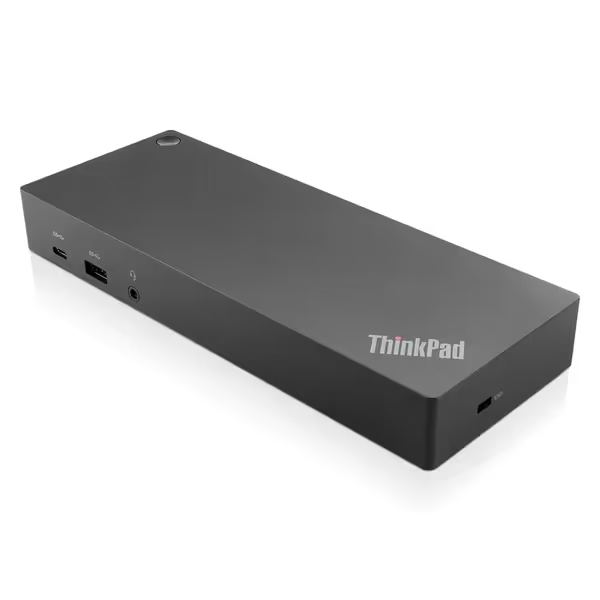
Lenovo ThinkPad Hybrid USB-C with USB-A Dock US
Universal docking with broad compatibility and essential connectivity.
$139.99
Video Output2x DisplayPort, 2x HDMI
Video Output2x DisplayPort, 2x HDMI
Pros
Enterprise-class universal docking for diverse fleets.
Supports ThinkPad RapidCharge & mobile device charging.
Cons
Inconsistent laptop charging reported by some users.
Mixed feedback on long-term functionality and value.
Customers give positive feedback about the docking station's build quality, connectivity options, and ease of setup, with one customer noting its compatibility for home office use.
Customers give positive feedback about the docking station's build quality, connectivity options, and ease of setup, with one customer noting its compatibility for home office use.
The Hidden Attack Vectors: Why Docks Aren't Just "Dumb Pipes"
Most IT leaders assume docks merely replicate ports, until a security audit reveals risks. If you need a refresher on the technology differences, see our USB-C vs Thunderbolt reality check for security and compatibility implications. Modified firmware in spoofed docks can silently intercept data during docking handshakes. Consider these often-overlooked vectors:
- Malicious USB descriptors: Docks impersonating HID devices (like keyboards) via USB port security flaws to inject keystrokes
- DMA attacks: Thunderbolt 3/4 docks bypassing OS security to access RAM directly (mitigated via Intel VT-d, but not macOS)
- Firmware persistence: Unauthorized code surviving OS reinstalls via dock controller chips
Enterprise reality check: 67% of "secure docking violations" stem from employees using public charging stations in airports or cafes, not from corporate-issued docks. Yet your compliance team cares about all endpoints. Standardized docks with signed firmware shut down the majority of these risks before they reach your desk.
How Data Actually Moves (And Where It's Protected)
When a user connects to a dock, data flows through multiple layers, each with distinct security implications:
- Video streams: Proprietary encoding (like DisplayLink's) compresses data before transmission over USB. Crucially, this isn't full encryption, but it prevents casual screen scraping. HDCP 2.2+ enforces end-to-end encryption for protected content (e.g., streaming services), though not internal corporate data.
- Ethernet traffic: The dock's NIC simply passes packets. True security happens at the OS level (TLS, IPsec) or network layer (MAC filtering). Our roundup of enterprise-grade, IT-tested docks highlights models with reliable MAC address passthrough and managed network features. This is why network isolation docks with MAC address passthrough are non-negotiable (without it, your NAC policies treat the dock as a new device, triggering port security lockouts).
- USB peripherals: Keyboards/mice pose minimal risk if the dock uses hardware-level isolation. But storage devices? That's where USB port security policies shine, blocking unauthorized media via Group Policy or MDM.
Standardize the kit, and your tickets standardize themselves.
Operational Safeguards That Reduce Real-World Risk
Forget theoretical "unbreakable" claims. Enterprise teams need actionable protections that survive refresh cycles:
Physical Security Docking Stations: Beyond the Kensington Lock
Yes, a tamper-resistant chassis lock prevents drive-by theft in shared workspaces. But true physical security means:
- Cable retention systems that withstand accidental yanks (critical for hot-desk turnover)
- Non-removable power bricks, because a missing PSU in a hoteling pod means a failed dock and 30 minutes of troubleshooting
- Firmware write-protection to prevent persistent malware embedding (e.g., Lenovo's Hybrid docks lock firmware updates behind administrative certificates)
Network Integrity Through MAC Passthrough
This isn't just a checkbox, it's your ticket to stable connectivity. Without MAC address passthrough, network switches see the dock as a new device every time. Result? Port security triggers, VLAN misassignments, and PXE boot failures. Enterprise-grade docks embed the laptop's MAC into dock traffic before the first packet transmits. Verify this feature: it's the difference between a 2-minute setup and 3-day onboarding delays. In mixed personal-and-corporate device environments, follow our secure BYOD docking guide to balance access with policy enforcement.
Your TCO's Silent Killer: Unsecured Firmware Updates
A dock that requires manual firmware updates via vendor software is a future ticket factory. Prioritize models with:
- Driver signatures (preventing spoofed DisplayLink installs)
- Secure boot compatibility (for Windows Autopilot or Jamf integration)
- OS-managed updates (e.g., pushing via SCCM instead of desk-side visits)
One global bank saved $220K/year by switching to docks with silent firmware pushes, eliminating 147 annual RMA cases from failed manual updates. For implementation steps and update workflows, use our standard docking setup guide.
The Standardization Imperative: Why Predictability Wins
Here's what security briefings never highlight: variety creates vulnerability. When we collapsed 12 dock SKUs into one Thunderbolt 4 kit (cable, PSU, labels baked in), ticket volume didn't just drop, it stabilized. Why? Because:
- Consistent firmware baselines meant no more "why does this dock work on John's laptop but not Sarah's?"
- Procurement predictability allowed 18-month lifecycle planning, no more scrambling when a niche SKU vanished
- User training became a 5-minute video instead of 12 role-specific guides
This isn't about avoiding innovation. To extend lifecycle ROI and reduce e-waste, review our repairability and 5-year TCO analysis. It's about TCO framing with simple math: If a $5 premium per dock (versus the cheapest SKU) prevents 1.2 support tickets/laptop/year, you're earning 300% ROI before counting breach avoidance.
Critical Evaluations Checklist
When vetting secure docking solutions, skip the spec sheet theater. Demand proof of:
- Cross-OS validation: Does it pass macOS security prompts without user intervention? Does Windows Group Policy enforce USB port security consistently?
- Lifecycle transparency: Minimum 3-year availability guarantee (ask for discontinuation history)
- Network isolation verification: Test MAC passthrough in your switch environment before bulk ordering
- Physical security specs: Actual pull-test ratings (not "industrial-grade" fluff)
Final Verdict: Security as Operational Stability
Dock security isn't about chasing zero-risk fantasies. It's about building predictable environments where risks are managed, not magical. The strongest docking station security features won't matter if your fleet has five different dock types struggling with DisplayLink driver conflicts. Standardize across three vectors:
- Protocol consistency (e.g., Thunderbolt 4 for high-risk teams, USB-C for general workers)
- Lifecycle alignment (matching dock availability to laptop refresh cycles)
- Operational simplicity (one cable, one PSU, one firmware baseline)
This is where "secure" becomes sustainable. When your help desk stops drowning in desk-related tickets, you'll realize the cheapest insurance isn't encryption, it's predictability. So buy once, cry never. Your future self (and your CFO) will thank you.